Event Posting & Processing
This section walks through the entire lifecycle of System Events (from origination to processing).
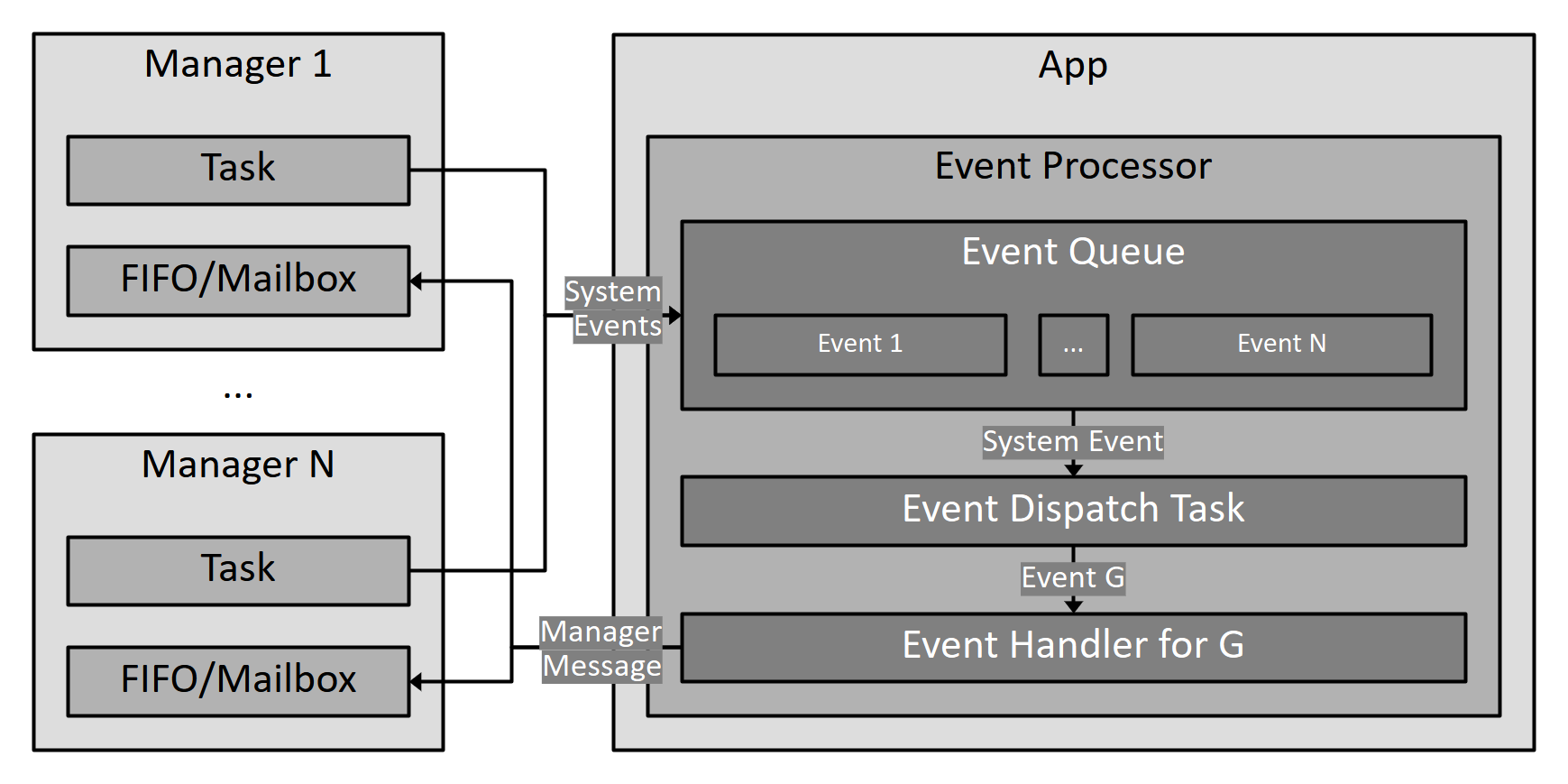
System Events are posted by Managers (from within their threads) to the App's Event Processor, and are consumed in FIFO order, i.e. they lack priorities. Each System Event has a type that indicates its contents, and an optional payload containing associated data (e.g. arm request from the RC Manager, new post estimated from the Pose Manager, connection established from the GCS Link Manager).
The Event Processor passes the System Event to its specific handler, which keeps track of the effects the System Event has on the System. These effects can include System State transitions and/or notifications/messages sent to other Managers.
System Event Handling
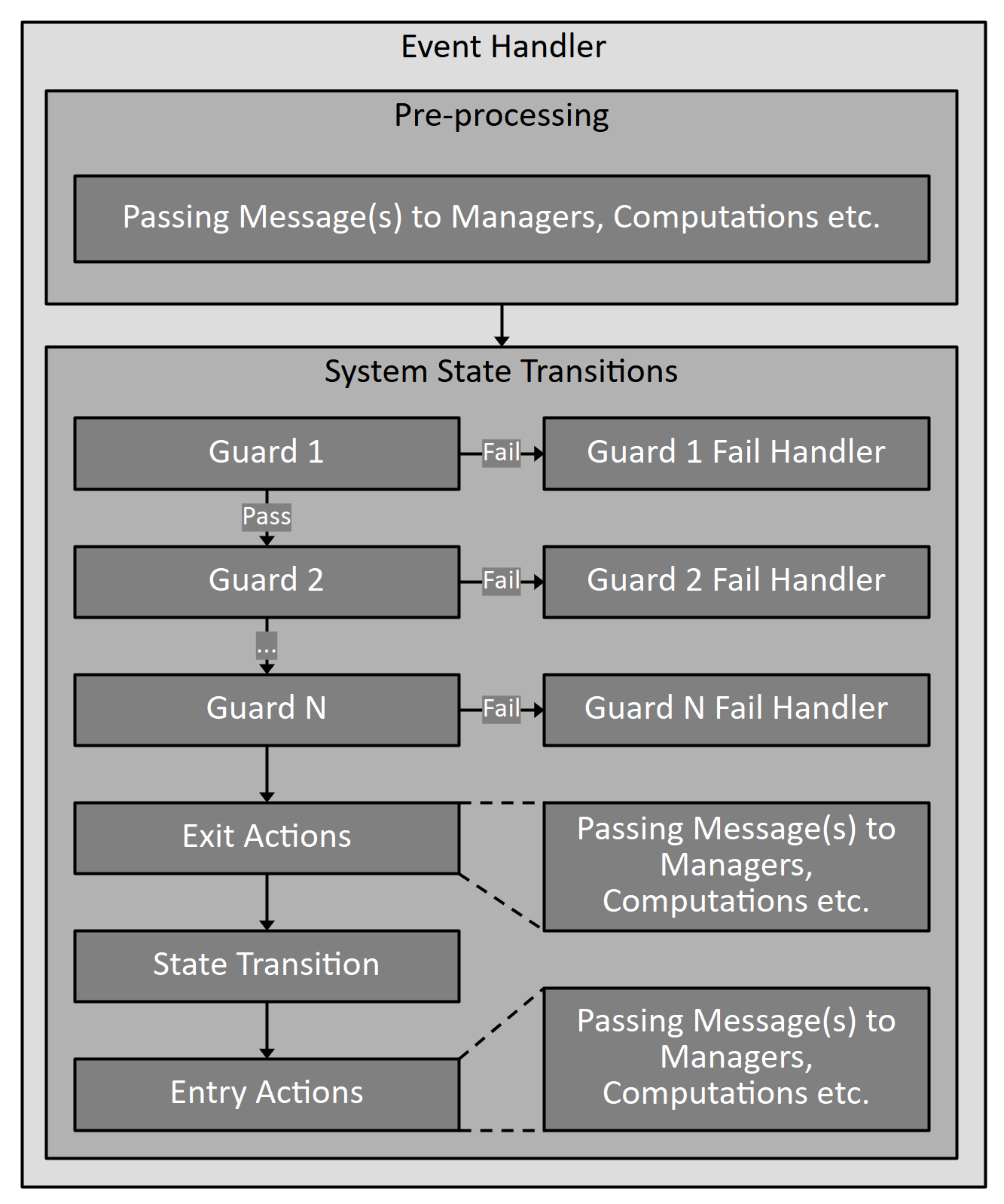
Generically, a System Event Handler has the following sequence -
- The Event can cause some computations and/or message-passing to other Managers. To prevent the Event Processor from starving other Managers of execution time, the computations are kept simple and quick (similar to an ISR).
- The Event can trigger a state transition -
- N Guards are checked in order, each having a pass/fail condition. The pass/fail condition of the Guards can only depend on the System State and involve simple operations (having dependencies on Manager's does not guarantee an immediate response as the Manager can be stuck in long computation). The Guards have read-only access to the System State.
- If the pass condition is not met, the failure handler corresponding to the Event and Guard is executed. The handler is complete and the Event Processor moves onto the next System Event.
- If all the Guards are satisfied, the exit action(s) for the current state are executed, which consist of simple computations and/or message-passing to other Managers.
- Once the exit actions are completed, the state transition is performed, which involves a read-update-write of the System State. This is done in a thread-safe manner by the App.
- Finally, the entry actions for the newly entered state are executed, which are similar to the exit actions.
Example 1: The Pose Manager's thread (running a loop at a fixed frequency) calculates a new Pose and posts this to the Event Processor. The Event Processor receives it and is responsible for forwarding it to the Flight Control Manager and GCS Connection Manager. As the GCS Connection Manager requires it at a lower frequency, the Event Processor maintains a counter to divide the frequency of the incoming Event and forward it to the GCS Connection Manager.
The above example illustrates a System Event that includes computations and messaging, but lacks a System State transition.
Example 2: The UAV is currently disarmed and the RC Manager's thread (running based on characters received from UART) creates a new Frame and sees that the Pilot wants to Arm the UAV. It posts an Arm Request to the Event Processor. The Event Processor receives this and starts to check if all the Guards pass - Is the Error State normal? If not, it instructs the GCS Connection Manager to send a message to the GCS stating the failed transition along with the cause. If yes, it checks whether the Prearm Calibration switch is on (part of the System State) and either transitions to the Armed State or Prearm Calibration State. It then instructs the GCS Connection Manager to send a message to the GCS stating the successful transition and the new Activity State. If the transition was to the Prearm Calibration State, it instructs the Pose Manager to re-calibrate all the sensors and refresh the Pose. Finally, it tells the Led Manager to change the indicator LEDs to reflect the new Activity State.
The above example illustrates a System Event that includes Guards and a System State Transition, along with the Guard Failure handler and entry actions.
List of System Events
RcFrameReceived
RcDisarmRequest
RcArmRequest
RcActivateRequest
RcPrearmOn
RcPrearmOff
PreflightChecksOk
PreflightChecksFailed
CalibrationOk
CalibrationFailed
PoseEstimated
SensorImuFailure
SensorImuOk
SensorMagFailure
SensorMagOk
SensorBaroFailure
SensorBaroOk
RawOutputChannels